
Mumblepad - Voice Notes to Clean Text
Messy voice notes, clean usable text
- For
- Busy professionals, entrepreneurs, creatives, and students who capture ideas while walking, driving, or between tasks
- Who are
- Frustrated by spending 2-3x recording length fixing inaccurate transcripts with grammar errors, missing punctuation, and scattered organization — negating any time savings
- We build
- Voice-to-text app that transforms messy voice notes into clean, immediately usable formats (to-do lists, emails, blog drafts, summaries) without manual editing or organizing
- Unlike
-
Otter.ai which produces raw transcripts requiring extensive manual editing for grammar, punctuation, and speaker identification errorsNotion which has no folder structure and creates overwhelming organizational chaosGoogle Keep which offers only basic transcription with no formatting or structure
- We deliver
-
Clean, properly formatted output in multiple usable formats (email, to-do, summary) without manual editingAutomatic organization and retrieval so you can find past ideas without perfect recallTransparent pricing with free trial for a few recordings, then unlimited paid access with no hidden limits
- So that
- Users can capture and use ideas immediately without sitting down to type, edit, or organize later



The Problem
Busy people capture ideas on the go via voice notes, but existing tools produce raw transcripts requiring 2-3x the recording length to fix errors, grammar, and formatting — negating any time savings. Users still 'scramble to capture budget, competitors, dates, and names' during conversations because verbatim transcription doesn't equal structured, usable output.
“The transcriptions are pretty inaccurate, and a ten-minute audio can take three times as long to fix because so much of it is wrong.”
G2 Review ↗“AI Meeting Notes has changed the way I run discovery calls because I can stay focused on how the prospect answers, instead of scrambling to capture budget, competitors, dates, technical concerns, and names while the conversation keeps moving.”
G2 Review ↗“Organization is another issue; there are no sub-folders, so conversations are just randomly scattered on a page, making it hard to find anything without a good search.”
G2 Review ↗“everything is free, then once all your work is uploaded and you start using it they will charge you cause you know 'you ran out of free blocks'. i rather restart my whole work in excell. shame cause the product is not bad. is the absurd monetisation tactic that made me leave the review.”
Trustpilot Review ↗“even a slight accent can throw it off, it will miss parts of the conversation entirely.”
G2 Review ↗“The software often splits one speaker into multiple ones with any slight change in voice tone.”
G2 Review ↗“Plus, it's overpriced for what it offers. I even got charged for an additional team member mistakenly added to my account without any prior notice.”
G2 Review ↗“Updates often make things worse, changing how features work without notice and breaking usability. Otter gives to the option to give feedback and I've left negative feedback multiple times, but nothing's changed for the better in over a year.”
G2 Review ↗“I love opening my Notion to start creating something new but easily get overwhelmed when I look at my sidebar and its full of things I haven't finished yet or can't organize in a way that reduces the mental load.”
G2 Review ↗“If it gets a transcription wrong, there's no easy way to correct it other than doing it manually myself.”
G2 Review ↗“Waiting for over 2 hours for a 28-minute video to upload. The last .1 Mb has been uploading for an hour. Waste of time.”
Trustpilot Review ↗Market Signals
Loading chart...
Competitors
Real-time meeting transcription and automated note-taking for professionals, with AI-powered summaries and speaker identification
The transcriptions are pretty inaccurate, and a ten-minute audio can take three times as long to fix because so much of it is wrong.
Professional-grade transcription service with human transcribers and AI options, focused on legal and business use cases
While that is true, in the fine print of the contract I agreed to (not on the overall description of the plan on the website), I was apparently tol...
Fast, accurate automated transcription with multi-language support and pay-as-you-go pricing
Waiting for over 2 hours for a 28-minute video to upload. The last .1 Mb has been uploading for an hour. Waste of time.
All-in-one workspace for notes, databases, project management, and knowledge management with AI features
everything is free, then once all your work is uploaded and you start using it they will charge you cause you know 'you ran out of free blocks'. i ...
Simple, fast note-taking app with voice notes, reminders, and cross-device sync in the Google ecosystem
How the offer ladders up
PDF guide showing how to structure voice notes for best results + 3 free transcriptions to test the product
50 voice notes per month, all output formats (email, to-do, summary, blog draft), automatic organization, mobile + web access
Unlimited voice notes, priority processing, advanced formatting options, custom output templates, export to Notion/Google Docs
Everything in Pro + shared team library, collaborative editing, admin dashboard, bulk export
Value Equation Breakdown
Alex Hormozi's framework for understanding if an idea will be easy to sell. Higher scores = easier sell.
7.5/10
↑Maximize these
Capture any idea on the go via voice and instantly receive clean, properly formatted text (email draft, to-do list, summary) ready to use without editing — saving 2-3 hours per week previously spent on manual transcription cleanup and organization
High — voice transcription technology is proven (Whisper API), and users are already paying for inferior solutions. The key differentiation (structured output formats vs raw transcripts) is technically achievable with GPT-4 post-processing and addresses the #1 complaint in research
↓Minimize these
Immediate — users see value within the first voice note. Unlike meeting tools requiring workflow integration, solo voice capture delivers instant utility
Low — no workflow changes required. Users already capture voice notes; they just get better output. Switching cost is minimal (no data migration, no team onboarding). Main sacrifice is learning which output format to choose for each note type
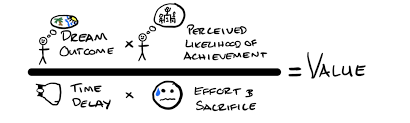
Alex Hormozi's Value Equation from $100M Offers. The higher your score, the easier your offer is to sell.
Understanding the Value Ladder
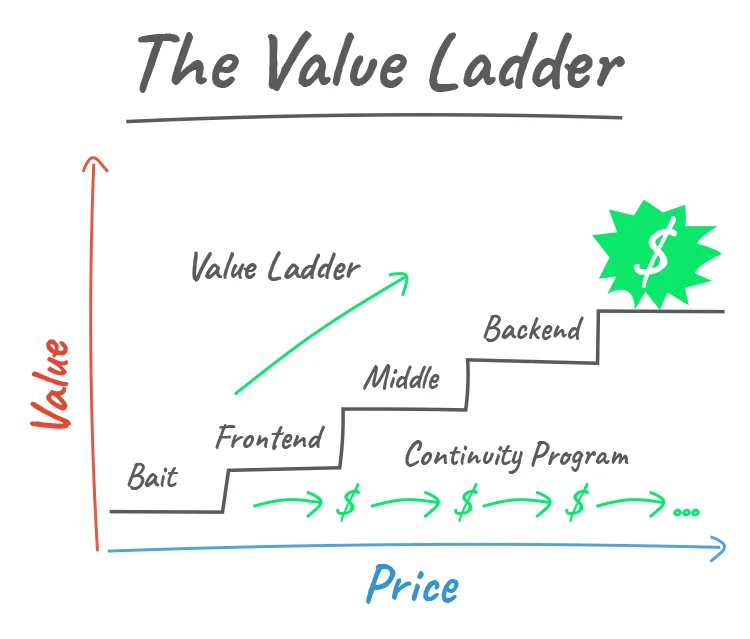
The Value Ladder structures your offers in ascending levels of value and price. Start with something irresistible and low-barrier, then build trust and deliver more value at each step up.
Why it works
The stages
Free value that builds trust and captures leads.
Low-ticket product that converts leads into buyers.
Your main product delivering the full solution.
Ongoing value through memberships or add-ons.
Premium, high-ticket solution for your best customers.
Framework: Russell Brunson — DotCom Secrets